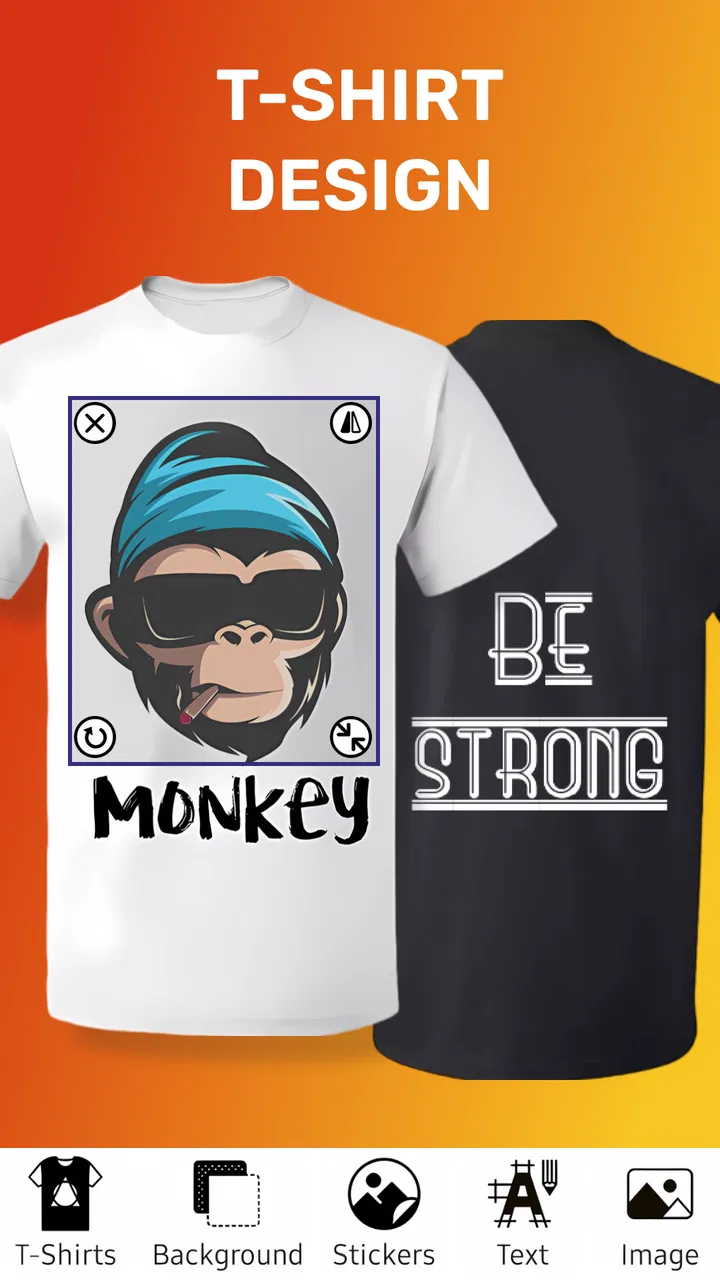
T Shirt Design - T Shirts Art
- 4.6
- Rating
- 5.00M
- Installs
- Free
- Price
 Analysis by App-foxy
I tried T Shirt Design - T Shirts Art as a quick way to plan clothing graphics without opening a full desktop design suite. My first impression was that it is aimed at people who want to experiment with a shirt idea directly on a phone: a slogan, a simple illustration, a name for a team, or a rough concept to discuss with a printer. It belongs to the Art & Design category, and its focus is much narrower than a general drawing app.
That narrow purpose is useful. Instead of starting with a blank canvas and building every tool from scratch, I could approach the task as a shirt-design problem. That makes the app easier to understand for someone who does not already know professional design software. At the same time, the focused approach means I would not treat it as a complete replacement for a serious graphics editor. Its value depends on whether I need a fast concept or a highly controlled production-ready file.
What it feels like to use for a real shirt idea
A realistic everyday use would be planning a shirt for a birthday, school activity, small club, or casual group event. I might have a phrase in mind, combine it with a basic visual element, and want to see whether the composition feels balanced before showing it to someone who will print it. This is where the app makes the most sense: it shortens the distance between an idea and a visible mock-up.
You May Also Like

 Blood Strike: 2.5 Anniversary
Blood Strike’s Loadouts Turn Every Drop Into a Tactical Gamble
A close look at Blood Strike’s custom loadouts: how fast access to signature weapons reshapes its battle royale rhythm, rewards preparation, and narrows the gap between fights.

 Pandora - Music & Podcasts
Pandora’s Music Is Easy to Start, but Harder to Recover
Pandora’s strength is its low-effort path from a seed to a station. Its weak spot is how much confidence it asks you to place in connection, setup, and quiet recovery.

 8 Ball Pool
 Is Built on Rivalries, Rematches, and Routine
A close look at the rivalries, rematches, shared routines, and unanswered safety questions that turn a quick pool match into a persistent mobile community.

 Samsung Music
’s Quiet Strength Is Playing What You Already Own
Its reach comes less from spectacle than from dependable access to a personal library. That simplicity is both the app’s strongest retention engine and its ceiling.

 AccuWeather: Weather Radar
AccuWeather Review: A Quick, Clear Forecast for Everyday Decisions
For everyday plans, the best forecast is the one you can understand quickly. AccuWeather makes rain timing, radar, and local conditions easy to act on, with a few trade-offs.

 Hill Climb Racing
Why Hill Climb Racing Still Turns Crashes Into One More Run
A tiny car, a bumpy hill and one more upgrade: Hill Climb Racing keeps resurfacing because its simple chaos makes every near-miss feel personal.
More From Our News Desk



I would begin with the message rather than decorative details. On a small phone screen, long wording can quickly become cramped, so I would test the shortest version of the phrase first. Then I would adjust the visual emphasis: the main words should remain readable when the design is viewed at a distance, while secondary decoration should support rather than compete with them.
One useful habit is to check the design at several sizes before deciding that it works. A graphic that looks attractive while zoomed in can lose its impact when reduced to the approximate size of a chest print. I also recommend leaving more empty space than feels necessary around the main artwork. Shirt designs are worn on moving fabric, not displayed on a perfectly flat screen, and crowded layouts tend to look less confident.
The app’s biggest practical advantage is the speed of this kind of visual trial. I can compare a few arrangements without committing to a complicated workflow. That is especially helpful when I am still deciding whether a phrase should sit above an image, below it, or work as the central element by itself.
Where the focused design approach helps
People who are new to design often struggle with the first decision: what kind of document should they create? A dedicated shirt-design app gives that decision a clearer context. I do not have to think first about a broad illustration project, poster format, or social-media canvas. I can concentrate on the relationship between artwork and clothing.
This also makes it suitable for brainstorming with another person. For example, if a friend wants a funny shirt but has only a rough idea, I can create a few visual directions and use them to ask better questions. Is the text too small? Does the image need to be simpler? Would the design work in one color? These questions are easier to answer after seeing a draft.
Another non-obvious use is rejecting weak ideas early. It is tempting to spend time polishing a phrase because it sounds good in conversation. Once placed into a shirt layout, however, it may feel too long, too ordinary, or visually awkward. A quick mobile mock-up helps me discover that before paying for printing or sending a design to someone else.
What it cannot replace in a professional workflow
I would choose a more advanced graphics application when the project requires precise vector paths, detailed color separation, complex typography, or exact print specifications. A specialized mobile tool can be convenient for arranging a concept, but convenience should not be confused with complete production control.
This distinction matters if the shirt will be sold, printed in quantity, or reviewed by a professional supplier. Before sending anything to print, I would ask the printer which file format, dimensions, background treatment, and color setup they require. I would not assume that a design that looks correct on the phone is automatically prepared for every printing method.
I would also skip this app as my main tool if my goal is freehand illustration, photo retouching, or a large multi-layer artwork. Those tasks call for controls that are normally found in broader art software. T Shirt Design - T Shirts Art is more convincing as an idea-building and layout tool than as a complete studio.
Trust starts with what the app actually asks me to do
Because this is an app for creating visual work, I pay attention to moments where a project might involve personal material. A shirt design can contain a child’s name, an inside joke, a club identity, or an image that I would not want casually shared. My practical rule is simple: I avoid placing sensitive information into a draft unless it is genuinely needed for the design.
I also review each visible choice before continuing, especially when the app requests access or presents an option connected with saving, sharing, or importing content. I do not treat a design app as automatically harmless just because its purpose is creative. The safest experience comes from understanding what I am selecting and keeping private material out of designs that do not need it.
For a casual project, I would work with a copy of any important image rather than the only original. I would also keep a separate record of the wording and visual ingredients used in the design. That small precaution protects me from having to reconstruct an idea if I later change the layout or decide to move the project into another editor.
Keeping control of a personal design
User control is most important at the point where a private draft becomes something shared. I would distinguish between saving a working version for myself, showing a preview to a friend, and sending a final file to a printer. Those are different decisions, and I would make each one deliberately rather than treating sharing as the natural next step.
Before sharing, I would inspect the whole image for details that were not meant to leave the project: names, phone numbers, event information, or background material accidentally included around the main artwork. This is a particularly useful check when a shirt is being made for a group. A simple crop or cleaner recreation can prevent an unnecessary disclosure.
I also prefer naming drafts clearly, using labels such as “front text,” “one-color version,” or “printer review.” That is not a glamorous feature, but it improves control when several variations exist. It reduces the chance of sending an early experiment instead of the version that everyone approved.
Cost, access, and the practical audience
The app is free to install, which makes it easy to test without an upfront purchase. It is rated for Everyone, so its basic appeal is broad: a teenager planning a group shirt, a parent preparing a family design, or an adult exploring a small creative project can all understand the premise without needing professional training.
There are in-app purchases ranging from under a dollar to just under one hundred dollars per item. That range makes it important to slow down around any purchase screen. I would check what a paid option unlocks, whether it is relevant to my particular workflow, and whether I am selecting a one-time item or something with broader consequences. I would not pay simply because a design feels unfinished; first I would identify whether the limitation is actually blocking the result I need.
The app has reached more than five million installs and holds a 4.6 average from roughly thirty-two thousand ratings, with hundreds of written reviews. Those figures suggest that many people find the concept useful, but popularity does not answer the questions that matter for my own project. I still need to judge whether its editing approach suits the level of control I expect and whether its visible choices feel comfortable when I handle personal content.
It was released in March 2020, and the current version is 2.1.1.1. It requires Android 7.0 or later. I would check the operating-system requirement before planning a project on an older phone, particularly if I am relying on that device for an event deadline. The developer is o16i Apps, and knowing that helps me identify the correct product when comparing similarly named design tools.
Three workflows that make the app more useful
My first recommended workflow is the “message before decoration” method. I write the shortest workable phrase, place it in the intended position, and judge its visual weight before adding graphics. This prevents a common mistake: building an attractive picture first and then squeezing the actual message into the remaining space.
The second is a “single-ink test.” Even if I eventually want a colorful design, I temporarily imagine or create the simplest version possible. If the idea remains recognizable with minimal visual complexity, it is more likely to survive different shirt colors and printing constraints. If it only works because of several small color changes, I know I should discuss production details before treating the concept as finished.
The third is a “distance check.” I place the phone across the room or reduce the preview until the design is small, then ask what I can read immediately. This reveals whether the hierarchy is working. It is a better test for clothing than staring at a zoomed-in canvas, because people usually see a shirt from several steps away.
I would add one more step for group projects: create a deliberately plain alternative. A simple text-led version gives everyone a reference point when opinions become complicated. It can also become the better final choice if the more decorated versions feel busy or are harder to reproduce.
How it compares with the usual alternatives
Compared with a general drawing app, T Shirt Design - T Shirts Art offers a more direct starting point for clothing concepts. A general tool may provide deeper brushes, layers, or illustration controls, but it also asks me to make more setup decisions. I would choose the general app when the artwork itself is the priority; I would choose this one when the shirt context is the priority.
Compared with a browser-based design service, a focused mobile app can feel more immediate for a quick personal draft. A browser tool may be better for collaboration, templates, brand assets, or a larger screen. If several people need to edit the same project, comment on revisions, or maintain consistent branding, I would lean toward a more collaborative platform.
Compared with hiring a designer, this app is clearly the lower-commitment route for experimentation. It lets me discover what I like before asking for professional help. That can actually improve a later commission because I can provide a clearer brief instead of saying only that I want “something cool.” The trade-off is that I remain responsible for visual decisions and for checking whether the final output meets printing requirements.
Who should try it, and who should look elsewhere
I think it is a good fit for casual creators, small groups, families, students, and anyone who wants to test a shirt idea without learning a large design package. It is especially useful when speed matters more than elaborate illustration. A person who has never designed clothing before can use the focused context to make decisions in a more approachable order.
I would be more cautious if the project involves a business logo, licensed artwork, a large order, or strict brand rules. In those situations, I would use this app for rough exploration and move the concept into a tool that provides more exact control. I would also look elsewhere if I need advanced drawing, detailed photo manipulation, or a shared professional workspace.
Privacy-conscious users should keep the same discipline they would use with any creative app: review visible choices, avoid unnecessary sensitive material, and decide consciously before sharing a draft. The app can help me make a design, but it does not remove my responsibility for what I put into that design or where I send it.
My cautious verdict
After using it as a shirt-concept tool, I see T Shirt Design - T Shirts Art as a practical starting point rather than an all-purpose art studio. Its strength is the focused path from an idea to a wearable layout. I can use it to test wording, compare visual arrangements, and discover weak concepts before they become expensive or time-consuming.
The free entry point makes trying it straightforward, while the broad range of optional purchase prices means I would pay attention before confirming anything. I would also keep personal information out of unnecessary drafts, review every sharing decision, and treat a phone preview as a concept check rather than automatic proof that a file is ready for professional printing.
My recommendation is positive for people who want a quick, approachable way to explore custom clothing ideas. I would install it for a family shirt, a one-off event, or an early design discussion. I would not make it the final stop for demanding commercial artwork. Used with that boundary in mind, it does something valuable: it helps turn a vague shirt idea into a design I can actually evaluate.
FAQs for T Shirt Design - T Shirts Art
01What features does the T Shirt Design app offer?
The T Shirt Design app provides a comprehensive set of features for creating custom t-shirts. Users can access a wide range of templates, fonts, and graphics to design unique apparel. The app also supports importing personal images and offers tools for adjusting colors, sizes, and layouts to suit your creative vision.
02Is the T Shirt Design app user-friendly for beginners?
Yes, the T Shirt Design app is designed with an intuitive interface that caters to both beginners and experienced designers. It includes easy-to-follow tutorials and guides to help new users navigate the design process, making it simple to create professional-looking t-shirts without prior design experience.
03Can I print my designs directly from the app?
The T Shirt Design app allows you to export your creations in high-quality formats suitable for printing. While the app itself doesn’t directly print, you can easily send your designs to a printing service or use a compatible home printer to bring your custom designs to life.
04Are there any in-app purchases or subscription fees?
While the T Shirt Design app offers a free version with basic features, there are in-app purchases available for additional templates, graphics, and advanced tools. Users can opt for a subscription plan to access premium features, ensuring a more expansive design experience.
05Is the T Shirt Design app available for both Android and iOS devices?
Yes, the T Shirt Design app is available for download on both Android and iOS platforms. This ensures that users across different devices can enjoy the app’s features and design custom t-shirts with ease, regardless of their smartphone or tablet preferences.
Pros
- Intuitive interface for easy design.
- Wide range of fonts and colors available.
- High-quality export options.
- Supports custom image uploads.
- Regular updates with new features.
Cons
- Limited free templates available.
- Occasional ads can be distracting.
- Some features require in-app purchases.
- Initial loading can be slow.
- No direct social media integration.

T Shirt Design - T Shirts Art
Gallery